Chrome extension · Free
Screen recordings that zoom where you click.
Record a tab, a window or your whole screen. Reframe follows your clicks with smooth zooms, so your demos and tutorials look edited before you edit them.
- No account
- Nothing uploaded
- Export up to full resolution
Everything a good demo video needs
The parts that usually take an hour in a video editor happen as you record.
-
Automatic zoom
Every click becomes a smooth zoom that frames what you clicked, then eases back out. Change any of them.
-
Clicks you can see
Click ripples, a styled cursor and the shortcuts you press, shown on screen so viewers never get lost.
-
Camera and mic
Add yourself in a circle or square, with a border and shadow. Drag it anywhere; it shrinks while zoomed.
-
A real editor
Cut mistakes, speed up the boring parts, copy and paste clips, and undo anything.
-
Sharp exports
MP4, WebM or GIF, from 720p up to your screen’s full resolution, with pretty backgrounds and frames.
-
Private by design
Recording, editing and exporting all happen on your computer. Nothing is uploaded, ever.
Polish it in seconds
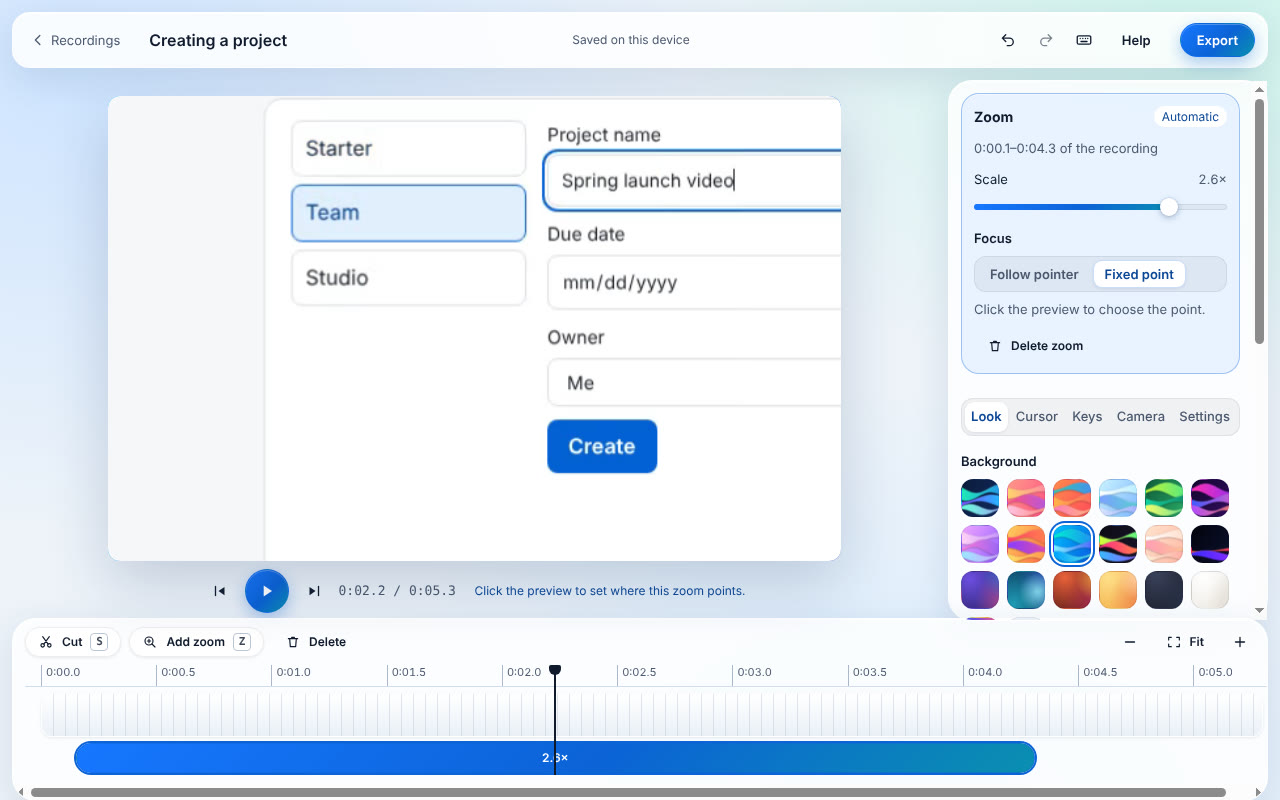
The editor opens the moment you stop. Your zooms are already on the timeline: move them, change how close they get, or add your own. Pick a background, round the corners, and export.
- Zooms, clips and speed on one timeline
- Backgrounds, padding, shadow and aspect ratios for every platform
- Keyboard shortcuts for everything
How it works
-
Record
Click the Reframe icon (or press Ctrl+Shift+Y), choose a tab, window or screen, and press Record.
-
Do your thing
Click, type and explain as usual. Pause any time with Ctrl+Shift+U.
-
Export
Stop, check the zooms in the editor, and export a video ready to share.
Want to try it on a safe page? Use the practice page.
Your recordings never leave your computer
Most screen recorders upload your videos to their servers. Reframe doesn’t have servers for your videos. Everything is stored in your browser on your own computer, and you choose where to save the final file.
- No account or sign-in
- No analytics or tracking
- Keystrokes aren’t logged; only shortcuts are noted, to show them on screen
- Read the privacy policy
Questions
Is Reframe free?
Yes. Recording, editing and exporting are free, with no account and no time limit on recordings.
Does it upload my videos?
No. Recordings, edits and exports stay on your computer, and Reframe sends nothing anywhere. It only goes online when you open one of its help pages.
Which browsers and systems does it work on?
Google Chrome 116 or later on Windows, macOS, Linux and ChromeOS. Other Chromium browsers such as Edge and Brave can install Chrome extensions too.
Do zooms work when I record a window or my whole screen?
Automatic zooms come from your clicks, which Reframe can see in browser tabs. For windows and screens you add zooms yourself in the editor with one click.
Will my videos look sharp?
Yes. Reframe records your screen’s real pixels, even with display scaling on or a Retina screen, and can export at full resolution.
Where are my recordings saved?
Inside Chrome on your computer, listed under Recordings in the editor. When you export, you choose where to save the video file.

Make your next demo the easy way
Free on the Chrome Web Store. Installs in seconds.
Coming soon to the Chrome Web Store